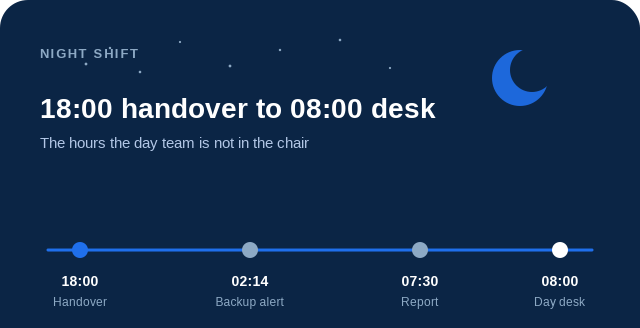
It is 2:14 AM. A client's file-server backup has failed for the second night running, a VPN tunnel is flapping, and your on-call engineer, who also worked a full day, has slept through the third page. Nothing is on fire yet. By 8:30 the client's office manager is on the phone and you are explaining a gap that was visible for six hours.
That gap is why most MSPs eventually look at a white-label NOC. It is also why the decision is easy to get wrong. The partner will hold privileged access to your clients, write tickets in your name and own the hours you can't see.
First, name what you are buying
Four different things get called "NOC":
- White-label NOC. A team that works inside your RMM and PSA, under your brand and your technician identity. Your clients never meet the vendor.
- Outsourced NOC. The same monitoring work, but it may run on the vendor's tooling and carry the vendor's name. Fine for some MSPs, but it is not white-label.
- SOC or MSSP. Security detection and response. A different job with different tooling. A NOC can triage an antivirus alert; it is not a SOC.
- Answering service. Takes a message and phones someone. Useful, but it is not monitoring or remediation.
This checklist is about the first. If a vendor can't say which one they are in a sentence, write that down.
How to use the checklist
There are eight areas below. Each has the questions to ask, what a strong answer sounds like and what should worry you. Ask in writing, because verbal answers disappear after the call, and score each area from 0 to 5 using the scorecard further down. Don't skip the unglamorous areas: permissions and handover are where most partnerships fail, not monitoring.
1. Coverage hours
"24/7" can mean three engineers on a rota or one phone shared with a day job. Ask for the shift schedule in your local time, and ask who is on it at 3 AM on the Sunday of a bank-holiday weekend.
Ask
Which hours are staffed by engineers on shift, and which are on-call?
Strong answer
Named shifts with seated engineers; on-call only as a documented second layer
Red flag
"24/7" that is really one pager
Ask
How are US holidays, UK bank holidays and regional weekends covered?
Strong answer
A published holiday calendar, with coverage and price stated for each
Red flag
A holiday premium that first appears on an invoice
Ask
Is it out-of-hours only, full 24×7, or overflow?
Strong answer
Written scope with exact handover times in your time zone
Red flag
The same SLA wording for every model
Ask
Response SLA: measured from which event?
Strong answer
From alert receipt to a named engineer taking action
Red flag
Measured from ticket creation, so the clock starts late
Follow-the-sun is a perfectly good model. It should come with overlap between shifts and a live handover, not an email and a prayer.
2. Tool compatibility
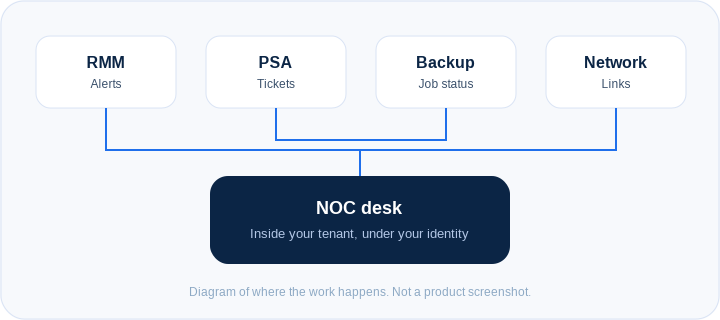
"We support everything" is not an answer. You want the vendor to name your exact RMM and PSA pairing and describe what they do inside each.
Ask
Which RMM, PSA, backup and network tools have you run in production?
Strong answer
Names your pairing and describes the setup
Red flag
A logo wall
Ask
Do you work inside our instances, or on your own tooling?
Strong answer
Inside your tenant, with named, revocable accounts and no new agents on client endpoints
Red flag
Their platform becomes the system of record
Ask
How do alerts reach you?
Strong answer
API or webhook ingestion, de-duplication, ticket correlation
Red flag
Email parsing only, which adds delay and duplicates
Ask
What do you need from us before go-live?
Strong answer
A short list: monitor inventory, runbooks, contact tree, maintenance windows
Red flag
No onboarding checklist
Ask for a redacted ticket the vendor created in your PSA type. The notes tell you more than the sales deck: what was checked, what was tried, what comes next.
3. Action permissions
This is the area most checklists skip, and the one that causes damage. A NOC that can do too little forwards alerts. A NOC that can do too much reboots a production hypervisor at 3 AM because a runbook was vague.
Put permission tiers in the contract, not just the sales deck:
Tier
0: Observe
What it allows
Read-only view of alerts and device state
How to grant it
Default for week one of any engagement
Tier
1: Acknowledge and ticket
What it allows
Acknowledge, enrich, create or update tickets, notify your on-call
How to grant it
Safe from day one
Tier
2: Pre-approved runbook actions
What it allows
Restart a named service, re-run a backup job, clear a stuck queue
How to grant it
Each action written down per client and logged in the ticket
Tier
3: Change needs approval
What it allows
Reboot production servers, change configs, touch users or permissions
How to grant it
Per-incident approval from a named contact
Then ask three more questions:
- Who writes the runbook, you or the vendor, and who approves changes to it?
- Is every action logged in the ticket with the actor and time?
- Can access be revoked in one step, and who holds the keys?
A useful test: "Restart the print spooler on SVR-FS01 at 2 AM." Is that Tier 2 and already in the runbook? Or does it need a call? A good partner answers instantly and can show you where it is written.
4. Escalation ownership
Most failed handovers come down to one thing: nobody knew who owned the ticket.
Ask
Who owns a ticket at 3 AM?
Strong answer
One named owner at all times; ownership moves only on an explicit acknowledgement
Red flag
A shared queue
Ask
What is the escalation path and clock?
Strong answer
A written tree, phone first, and a set number of minutes before the next contact is tried
Red flag
"We'll email you"
Ask
Who talks to your end customer?
Strong answer
You decide: silent partner under your brand, or scripted comms you approve
Red flag
Their staff contacting your clients without a script
Ask
What happens when the NOC gets it wrong?
Strong answer
A review within a set window, the runbook updated, shared in the next report
Red flag
No post-incident process
Ask the vendor to walk you through a P1 at 3 AM, including the step where your on-call doesn't pick up. If the story ends there, the process does too.
5. Reporting
Ask
What do daily and weekly reports contain?
Strong answer
Alerts received, tickets created, time to acknowledge, auto-resolved versus human-needed, noisiest monitors, tuning proposals
Red flag
Totals only
Ask
Can you break it down per client?
Strong answer
A per-client view you can forward or white-label
Red flag
One blended number
Ask
Where does the data live?
Strong answer
In your PSA, with a raw export you can take with you
Red flag
Locked in a vendor portal
Reports built from your PSA timestamps are verifiable. Reports from an internal system you can't log into are a promise.
6. Security and access
The partner holds the keys to every client you serve. Ask what they hold, and what they never will.
Ask
What accounts will you need, and with what rights?
Strong answer
Named technician accounts, least privilege, MFA where your tool supports it
Red flag
Shared credentials passed around in a spreadsheet
Ask
What will you never have?
Strong answer
A stated list (for example domain admin, billing access, exported client lists)
Red flag
"Whatever you give us"
Ask
Where are your analysts, and who signs what?
Strong answer
Locations stated, NDA signed per analyst, a data-processing agreement where personal data is involved
Red flag
Vague answers about location or subcontractors
Ask
How do you offboard an analyst or end the contract?
Strong answer
Access revoked the same day, in one step
Red flag
No written process
Be careful with certification claims. "SOC 2 aligned" and "SOC 2 certified" are different statements. Ask for the control set or audit evidence under NDA.
7. Pricing and contract
Ask
What is the pricing unit, and what counts as one?
Strong answer
Per endpoint per month, with a written definition of an endpoint
Red flag
The unit is defined after signing
Ask
What is excluded?
Strong answer
Setup, holiday, after-hours and overage terms listed up front
Red flag
Vague "custom" line items
Ask
Can we see the price before a long sales process?
Strong answer
Cost drivers explained and a calculator, or a quote within a business day
Red flag
"Contact us" for everything
A missing rate card isn't automatically a red flag: a 400-endpoint MSP on one clean RMM and one on three RMMs after two acquisitions are different jobs. What matters is how fast you get a straight, line-by-line answer. To model your own side first, use the in-house NOC cost calculator.
8. Pilot terms
Never judge a NOC partner from a deck. Judge them on your alerts.
Ask
How long is the pilot, and on which clients?
Strong answer
Two to four weeks on a representative subset, with a fixed scope
Red flag
No pilot, or a "pilot" that is a signed annual contract
Ask
Is there a shadow period?
Strong answer
The NOC watches your live alerts and logs what it would have done, with no action rights, before go-live
Red flag
Straight to live
Ask
What are the success criteria?
Strong answer
Agreed in writing before day one: time to acknowledge, correct escalations, handover completeness, false-escalation rate
Red flag
Success defined afterwards
Ask
How do we exit?
Strong answer
Short notice, runbooks and ticket history returned, access revoked in one step
Red flag
Long lock-in, no data return
Score the shortlist
Score each area 0 to 5: 0 means no answer, 3 means a clear written answer, 5 means they showed you an artifact, such as a sample runbook, a redacted report or a reference call. Multiply by the weight.
Coverage and holidays
Suggested weight: 15 out of 100
Tool compatibility
Suggested weight: 15 out of 100
Action permissions
Suggested weight: 15 out of 100
Escalation ownership
Suggested weight: 15 out of 100
Reporting
Suggested weight: 10 out of 100
Security and access
Suggested weight: 10 out of 100
Pricing transparency
Suggested weight: 10 out of 100
Pilot and exit terms
Suggested weight: 10 out of 100
Adjust the weights to your risk. An MSP with regulated clients should push security up. Whatever the weights, treat a score of 0 in permissions, escalation or security as a stop, however well the vendor does elsewhere.
Copy this: Shift Handover Protocol
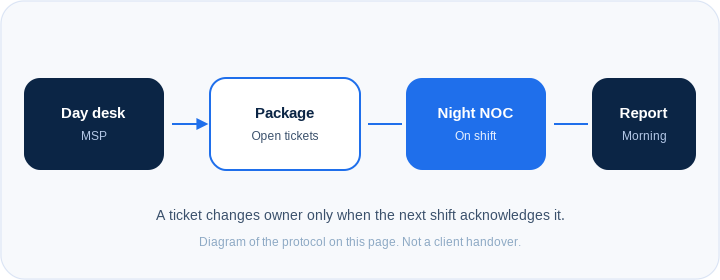
Most of the pain in a NOC engagement sits at the seam between your day team and theirs. This protocol puts the seam on paper. Replace everything in [brackets] and keep the rest. The minutes and times are suggested defaults, not anyone's commitments.
SHIFT HANDOVER PROTOCOL: MSP <-> White-Label NOC
Version: [1.0]   Owner: [MSP service delivery lead]   Effective: [date]

1. HANDOVER WINDOWS (local time)
   - MSP -> NOC: [18:00], package sent by [17:30]
   - NOC -> MSP: [08:00], report sent by [07:30]
   - Weekends and holidays: [Friday 18:00 -> Monday 08:00],
     with a mid-point check at [Saturday 12:00]

2. OUTGOING PACKAGE (sender completes every line; "none" is a valid answer)
   [ ] Open P1/P2 tickets: ID, client, current state, owner, next action, deadline
   [ ] Active maintenance windows and change freezes, with start/end times
   [ ] Known-noisy alerts and approved suppressions, with expiry dates
   [ ] Clients with special instructions (VIP, regulated, do-not-touch systems)
   [ ] Pending approvals and who can grant them tonight
   [ ] On-call roster: name, phone, backup contact, time zone

3. OWNERSHIP RULES
   - A ticket changes owner only when the receiver writes "ACK <name> <time>".
   - Until ACK, the sender owns it and stays reachable.
   - Every ticket carries one named owner. Never "team" or "NOC".
   - The owner writes the next action and its deadline in the ticket
     before handing over.

4. ACTION PERMISSIONS DURING THE SHIFT
   - Tier 1: acknowledge, enrich, ticket, notify. Always allowed.
   - Tier 2: runbook actions listed per client. Log each action in the ticket.
   - Tier 3: anything else needs approval from [named contact].
     Record who approved and when.

5. ESCALATION CLOCK (adjust the minutes to your SLA)
   - P1: phone [primary on-call]. No answer after [10] min, phone [backup].
     After [10] more, phone [owner/director].
   - P2: phone or SMS [primary]. No ack after [20] min, move to backup.
   - P3/P4: ticket and morning report. No overnight contact.
   - Email is never the only channel for P1/P2.

6. INCOMING REPORT (NOC completes before handing back)
   [ ] Alerts received / tickets created / tickets closed
   [ ] Actions taken, each with ticket ID and the approval reference
   [ ] Items needing a human decision this morning, ranked
   [ ] Recurring alerts with a tuning proposal
   [ ] Near-misses and SLA breaches, with cause

7. CLOSE-OUT
   - Both sides post "HANDOVER COMPLETE <time>" in [channel/ticket].
   - Anything unacknowledged within [15] min of the window starts the
     escalation clock.
   - Review the protocol monthly: remove steps nobody uses, add the one
     that failed last.
Run it for a week with your own team before you hand it to a vendor, so you find the gaps on your side first. Keep the monthly review in section 7: the protocol that works in month one is rarely the one you need in month six.
How NOC247 answers these questions
We would rather you check our answers than trust them. Everything below is published on the linked pages.
Area
Coverage
What we publish
Hours, weekends and holidays are named on the quote. A holiday is not assumed.
Where to check
Hours and cover, pricing
Area
Response
What we publish
Clocks are defined. Minute targets are agreed per quote, not printed as a guarantee.
Where to check
Service levels
Area
Tools
What we publish
A technician account in your tenant. Product pages name what we will not assume. No native connector claim.
Where to check
RMM and PSA hub
Area
Permissions
What we publish
Actions on the approved runbook only. Anything else stops and escalates.
Where to check
Managed NOC
Area
Escalation
What we publish
Named contact, then a fallback. The client relationship stays with you.
Where to check
White-label NOC
Area
Reporting
What we publish
The handover is on the ticket. A report is only as good as those ticket notes.
Where to check
Shift handover
Area
Pricing
What we publish
No public rate card. Standard onboarding has no setup fee. Further work is quoted first.
Where to check
Pricing
Area
Delivery
What we publish
Hours, devices and approved actions are named on the quote.
Where to check
About
Area
Onboarding
What we publish
Access, mapping, a check that the account works, then the agreed hours. Day counts are not published.
Where to check
Managed NOC
Exit terms and contract length are agreed on the scoping call, so put the "how do we exit?" question to us like any other vendor.
A four-week way to run the process
- Week 1: shortlist and ask. Pick three vendors and send all three the same written questions.
- Week 2: score and verify. Score the answers. Ask for two references from MSPs of similar size and stack, and ask them what went wrong in the first 30 days.
- Week 3: shadow. Run the vendor observe-only on a handful of clients and compare what they would have done with what your team did.
- Week 4: decide. Score again against the success criteria you wrote in week 1. Sign only what you have tested.
Frequently asked questions
How much coverage does an MSP need from a white-label NOC? It depends on the gap you actually have. Many MSPs start with out-of-hours cover (nights, weekends and holidays) while their own team handles business hours, then move to full 24×7 once the runbooks are proven. To size the gap before you talk to anyone, send one week of after-hours alerts to the free After-Hours Alert Audit.
What should a white-label NOC be allowed to do in my RMM? Start narrow. Let them observe, acknowledge and ticket, then add pre-approved runbook actions per client, such as restarting a named service or re-running a backup job. Anything that changes configuration or reboots production servers should need an explicit approval. Write the tiers into the contract.
How long should onboarding or a pilot take? Ask any vendor, including us, what the pilot actually includes. A read-only look at alerts is observation: the team writes what it would have done and does not take live actions. NOC247 does not publish a day-count for onboarding or a trial length on this page. The alert audit is one exported week, not a live trial.
How is a white-label NOC priced? Ask for the definition of an endpoint and for exclusions such as setup, holidays and devices outside the list. NOC247 does not publish a rate card. Standard onboarding has no setup fee. Model an in-house desk with your own rates on the calculator. The handover checklist is a separate document: shift handover. Do not treat the protocol earlier on this page as that checklist.
What is the difference between a white-label NOC and building one in-house? In-house gives you full control but needs several engineers to cover every hour once you allow for leave and turnover. A white-label NOC covers the hours per endpoint and leaves the client relationship with you. The in-house versus white-label comparison sets out both.
Ready to see your own overnight alerts?
Before you compare vendors, find out how much of your overnight noise needs a human.
- Get the free After-Hours Alert Audit
Send one week of after-hours alerts from your RMM and get counts and examples from your own data.
- Book a 30-minute scoping call
We'll walk through your RMM, endpoint count and overnight gaps.